HabitGrip vs. TickTick: Task Manager or Habit Tracker?
TickTick's habit module is solid for five free habits inside your task manager, at US$49.99 a year for the suite. HabitGrip is habits-first: no account, skip and vacation records, $39.99 once. Where each wins, honestly.
If you already live in TickTick, the honest answer is that its built-in habit tracker is good enough for a short list of daily habits, and you may not need a second app at all. The free plans of both apps stop at five habits, TickTick Premium costs US$49.99 a year, and HabitGrip's upgrade is $39.99 once. What actually separates them is the shape of the app: TickTick is a task manager with a habit module inside it; HabitGrip is a habits-first tracker with light tasks, no account, and data that stays on your phone by default. Both free tiers stop at the same number for different reasons, and the upgrade paths differ more than the caps do.
Choose TickTick if your week runs through its task lists and calendar anyway, and your habits are a handful of check-ins attached to that system. Choose HabitGripif habits are the main thing you are working on and you want skip records, vacation pause, context profiles, every-N-day schedules, and a record you own without an account. This is written by the maker of HabitGrip, and the TickTick facts below were checked on TickTick's own pricing, feature, and help pages on October 24, 2026.
HabitGrip and TickTick at a glance
| Aspect | TickTick (habit module) | HabitGrip |
|---|---|---|
| What the app is | A to-do, calendar, and focus suite; habits are one module of it | A habits-first tracker with one-off and recurring tasks beside them |
| Free habit cap | 5 habits | 5 habits, with widgets included |
| Upgrade path | Premium, US$49.99 per year, every year: 299 habits plus unlimited statistics, widgets, and calendar views | Pro, $39.99 one time, unlimited habits; Ultra (from $19.99 per year) adds sync and automatic backups |
| Habit schedules | Daily on chosen weekdays, or Weekly at a set times-per-week target | Daily, selected weekdays, every N days, weekly frequency goals, ordinal dates such as the 1st and 15th |
| Recording methods | Automatic amount, manual amount, complete-all check | Yes/no, numeric, timer, checklist items |
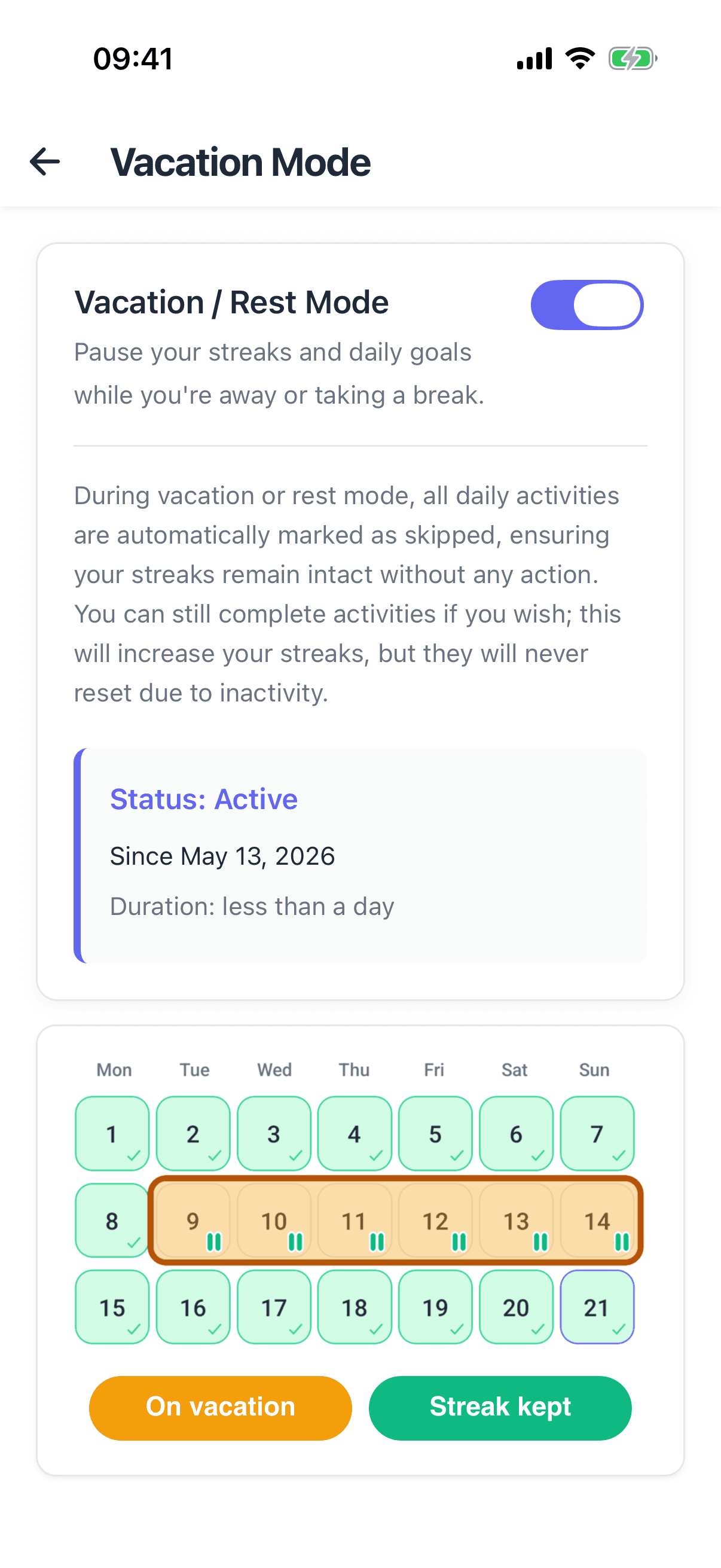
| Skips and breaks | Missed-day logs can be backfilled; the habit help pages document no skip record or vacation-style pause | Skipped is its own honest record; Vacation Mode pauses habits and keeps history |
| Statistics | Check-in overview and monthly table per habit; listed Basic on free and unlimited on Premium | Consistency heatmap, streaks, momentum, and full history included on the free tier |
| Account and data | Account required, data cloud-synced; habit export to Excel announced, account backup excludes habit records per user reports | No account needed for daily tracking; local backups and exports; optional account for sync only |
| Platforms | iOS, iPadOS, Android, Windows, macOS, Linux, web app, browser extension | Android and iOS apps, local-first |
| Where habits live | Beside tasks in Today and Next 7 Days, and in the calendar via Show Habit | A dedicated Today view with habits and tasks, profiles for separate contexts |
What TickTick gets right about habits
The strongest argument for the module is that it is already in the app you open twenty times a day. TickTick's habit settings let you show habits inside Today and Next 7 Days, and a view option puts habit check-ins into the calendar timeline next to your meetings. That visibility inside the daily plan is exactly what vertical trackers try to replicate with widgets, and TickTick gets it for free as a side effect of bundling.
The tracking mechanics are better than a checkbox, too. The help center documents three recording methods on one habit: automatic counting for a fixed dose like a glass of water, manual entry for a variable dose like pages read, and a complete-all check for habits done in one go. Frequency settings cover daily habits on chosen weekdays and weekly goals such as three times a week, a changelog notes up to ten reminders on a single habit, and a missed day can be backfilled on the habit's detail page. Habits can be grouped into morning, afternoon, evening, and other sections, and there is a habit heatmap widget pinned next to a Today's Habits widget.
For the money-or-nothing reader: TickTick's free plan includes cross-platform sync on every platform it ships for, and no other piece of Premium is required to use the habit module. Five habits in a suite you already pay nothing for is a genuinely good deal if it covers your list.
Where TickTick's habit module runs out
The first wall is the count: five habits free, and the plan table makes explicit that habits beyond five, along with unlimited statistics, widgets, and calendar views, sit behind Premium at US$49.99 a year. If you were considering TickTick mainly for habits, weigh that against the fact that a five-habit list is exactly where a dedicated free tier like HabitGrip's stops too, so the module only pulls its weight if the task features are also part of your day.
The second wall is what the help pages do not document. There is no skip record for a habit you deliberately did not do and no vacation-style pause for planned breaks, so a missed week reads the same as an abandoned one in anything the interface surfaces. Schedule types cover chosen weekdays and times-per-week targets, and the checking of life's odder rhythms, every second day, ordinal dates, a routine that belongs to a different calendar than your tasks', is left to habits being redone as offline tasks. There are also no timer or checklist record types: a four-step morning reset cannot live inside a habit the way it can in trackers built for that.
The third wall is data ownership. Using TickTick means an account, and your check-ins live on TickTick's servers; the web backup is documented for tasks, and users report habit records are absent from it. TickTick has announced a habit export to Excel from the habit screen, which is worth running before any plan change, but the continuity story is thin compared with an app whose default is a log on your own phone.
Where HabitGrip is the better fit
HabitGrip is built for the reader whose habits are the project. Schedules go beyond what the TickTick module offers: selected weekdays, weekly frequency goals, every-N-days repeats, ordinal dates, which is the toolkit for routines that are real but not daily. A skipped day is its own record rather than a lie by omission, and Vacation Mode pauses habits for a planned break without pretending it never happened. Profiles keep work, home, and health routines from bleeding into each other, and tags make the same structure useful for weekly reviews.
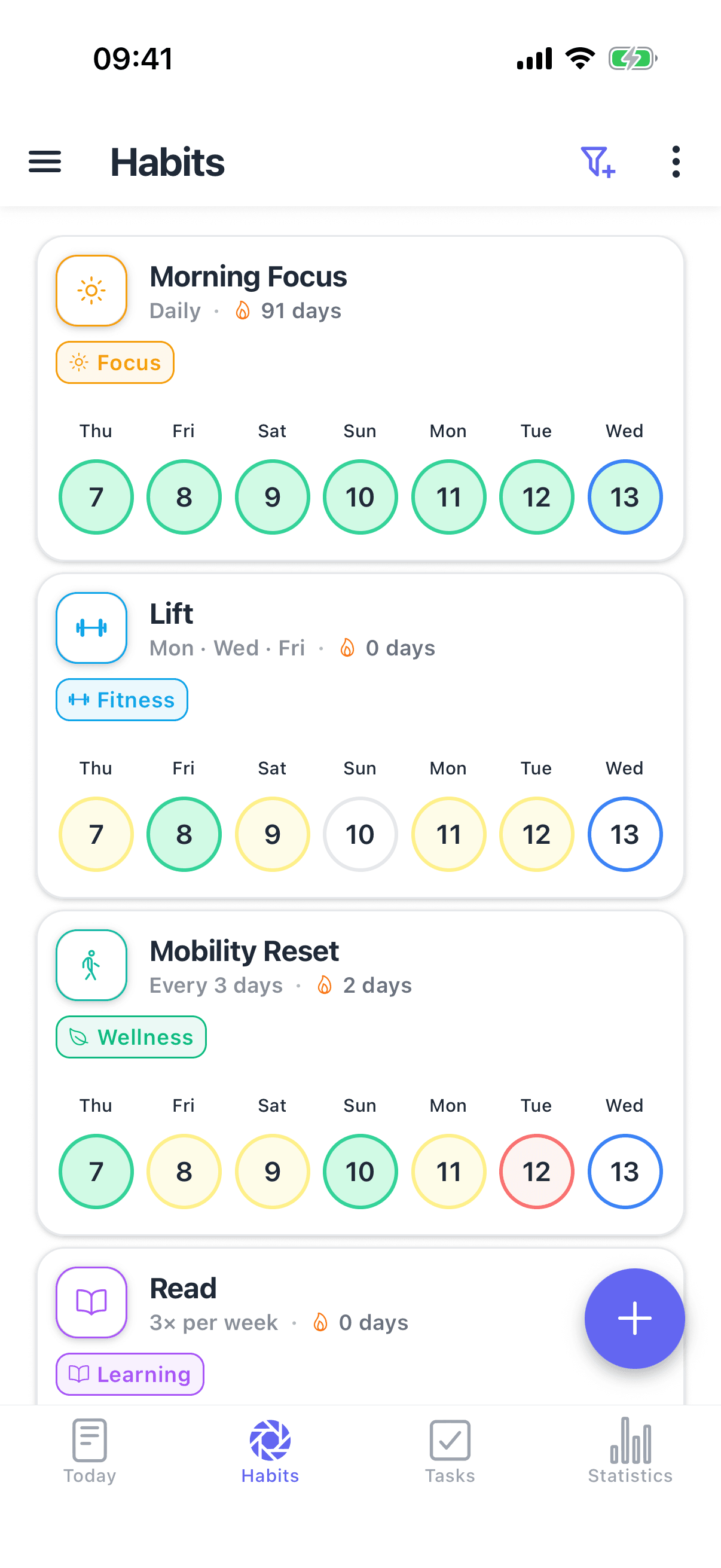
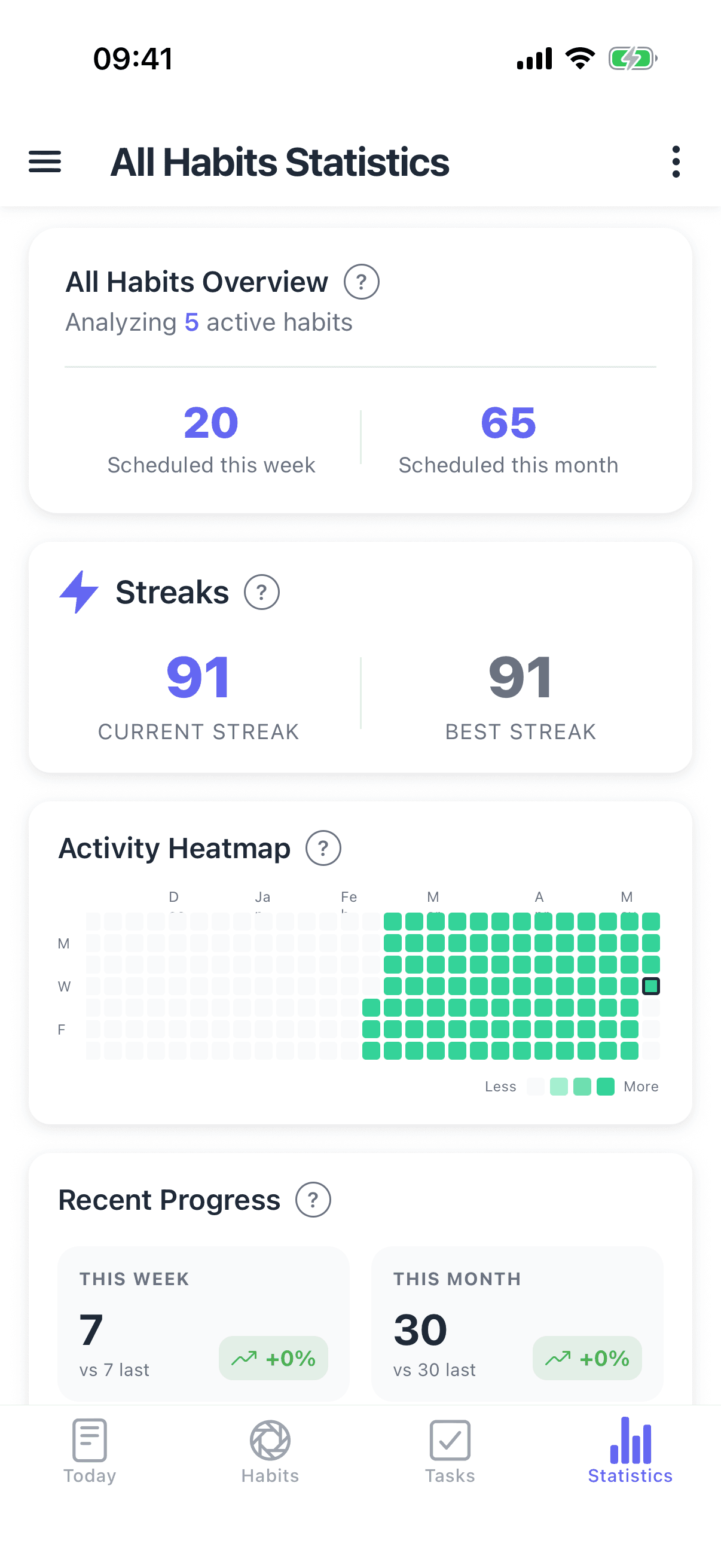
Record types match habits as they actually occur: yes/no for a check-in, numeric for pages or glasses, a timer for deep-work or practice blocks, and checklist items for a multi-step routine. The statistics view includes a consistency heatmap, streak records, momentum, and your full history, and none of it is gated: the free tier is five habits with widgets and full statistics, and the Pro upgrade that lifts the habit limit is $39.99 once rather than a renewal you remember every January.
And because HabitGrip is local-first, all of this works without an account and without sending habit data anywhere, with local backups and exports you control. Sync across devices exists as an optional extra, not as the product's architecture. If the reason you hesitate about TickTick is what your check-in history is worth and who holds it, that is the short version of the difference.
Where HabitGrip falls short
Making the honest list, because this page reads fairer with it at the top of the fold than buried: HabitGrip ships on Android and iPhone only. There is no web app, no Windows, macOS, or Linux client, and no watch version, so anyone who needs to check habits off at a desk or from a browser keeps a gap TickTick does not have. There is also no calendar integration, no collaboration or shared lists, and no natural-language input, because tasks inside HabitGrip are the plain local kind: one-off and recurring, for one person's Today view. TickTick Premium covers projects, shared lists, and multiple calendar views that HabitGrip does not attempt. And the habit cap on the free tier is the same five, so the practical improvement is in structure and record types, not headroom. If your week lives in TickTick already, that is a real cost, not a rounding error.
The price behind the five free habits
Both free tiers stop at five habits, which makes the caps a coincidence rather than parity, because the paid paths they lead into are built differently. TickTick Premium is US$49.99 every year and buys a whole productivity suite; the habit module is one beneficiary of it. HabitGrip Pro is $39.99 once and buys the habit tier: unlimited habits from then on, with sync and automatic backups available on the separate Ultra plan if you want them. Over five years the TickTick route costs $249.95 and the HabitGrip route costs $39.99, and the waiting is only worth it if the suite, the desktop apps, and the calendar side are things you would buy anyway.
Prices were checked on TickTick's pricing page and HabitGrip's store pages on October 24, 2026; both change and some storefronts list region-specific tiers, so confirm in your own account before payment. Non-US TickTick pricing may differ from the US$49.99 figure quoted here.
Switching from TickTick to HabitGrip
There is no TickTick importer in HabitGrip. The ready-made importers cover Loop Habit Tracker, Habitify, Habit Bull, Productive, and HabitNow, and TickTick is not one of them because its habit module never offered an export a converter could read its way through; the Excel export of habits is good for keeping a record but not a mapping source for a different app's schema. So the switch is manual, with one step that matters first: run the habit export from TickTick's habit screen and screenshot your statistics pages, since the account backup does not include habit records.
Then rebuild deliberately rather than copying everything: create each habit with the schedule it really has, not the daily schedule TickTick's module probably forced on it. Ten minutes covers a typical setup. Run both apps in parallel for a week, confirm the schedule types feel right, then let TickTick keep tasks and calendar, and HabitGrip keep habits. The parallel week is also the point at which you should decide which app owns each check-in, so you never enter the same routine twice.
Frequently asked questions
Does TickTick have a habit tracker?
Yes. TickTick includes a habit module you can enable from Settings: check-ins with goals, a habit heatmap widget, a habits widget for the home screen, per-habit frequency and reminder settings, habit statistics (check-in overview plus a monthly table), and the option to show habits in Today, Next 7 Days, and the calendar view. It is deliberately designed as part of a task manager, not as a standalone tracker.
How many habits can you track in TickTick for free?
Five. TickTick's plan comparison sets Habit Count at 5 on the free plan and 299 on Premium, which costs US$49.99 a year on TickTick's website. That makes the free tier identical in size to HabitGrip's own five-habit free tier. The difference is what surrounds the number: unlimited habits elsewhere unlock with a one-time purchase in HabitGrip and a yearly subscription in TickTick, and TickTick Premium also pays for the rest of the suite, from multiple calendar views to 299 task lists.
Is the TickTick habit tracker good enough?
For a short list of simple, mostly daily habits inside the task app you already open, yes, it is a solid module: three recording methods, weekly frequency goals, a heatmap widget, and backfilled logs for a missed day. It starts to feel thin when habits become the main thing you work on: the plan table gates statistics, widgets, and calendar views behind Premium, the habit help pages document no skip record or vacation-style pause, supporting schedules cover chosen weekdays and times-per-week but not every-N-days or ordinal dates, and there are no timer or checklist record types for a multi-step habit. If any of those is the reason your habits fail, a dedicated tracker fits better.
Can I export my TickTick habit history?
Partially, and it matters before you switch. TickTick's own announcement says habits export to Excel from the habit screen (Habit, then more, then export), but users report that the account backup generated on the web contains tasks and notes only, without habit records. So before cancelling Premium or deleting your account, run the dedicated habit export yourself and keep the file. An archive of check-in history is the one thing you cannot reconstruct later.
Can I move my TickTick habits to HabitGrip?
Not as a direct import. HabitGrip's ready-made importers cover Loop Habit Tracker, Habitify, Habit Bull, Productive, and HabitNow, and there is no TickTick importer because TickTick has no habit feed the converters could read. The practical path: run TickTick's Excel export, take screenshots of your statistics as a backup record, recreate your habits in HabitGrip with schedules that reflect how you actually live, and backfill recent days from the export if you want continuity. A typical setup takes about ten minutes to rebuild; use the rebuild as an audit and drop the habits you were never going to keep.
Should I keep TickTick and add a separate habit tracker?
That is a common and sensible split rather than an either/or. Many people keep TickTick as the task and calendar hub and run a dedicated tracker for habits, in the same way people pair a task manager with a note app. If you do, turn off the duplicate record keeping on one side so a check-in never needs to be entered twice: either log habits only in the tracker and tick tasks only in TickTick, or let one of the two own each routine.
Sources
- TickTick pricing page: Habit Count 5 to 299, Premium US$49.99/year
- TickTick features page: habit tracker module overview
- TickTick download page: platforms
- TickTick Help Center FAQ: habit statistics, reminder settings, habit logs, backfilled check-ins, Show in Today
- TickTick Help Center: Better Achieve Habits, recording methods and goal amounts
- TickTick Help Center: Start a New Habit, heatmap widget
- TickTick blog: Frequency and Reminder settings, up to 10 reminders per habit
- TickTick Help Center: Data Backup and Import
- TickTick's official account on Instagram: habit export to Excel
Deciding whether habits and tasks should share one app at all is a separate question, and our guide to a habit tracker and to-do app pairing covers both directions, including when one app is enough. The count the free tiers stop at, five habits, is also the point where the how-many-habits guide says a forming list should sit anyway.
Still comparing? See HabitGrip vs. Loop, our honest guide to the best free habit trackers, the ranked 2026 list of the best habit trackers overall, and the complete guide to habit tracking.